Apimac Clean Text

Apimac Clean Text
License:
Trial version
Language:
English
Developer:
OS:
Mac OS X
Added:
See detailed info

Softonic review

Cyril Roger

“Reduce text cleanup time”

by Cyril Roger about Apimac Clean Text

Cleaning up a copy can take up lots of your time. This is why you need to make sure that your text processor or editor handles it or that you have a specific program to take care of the job.

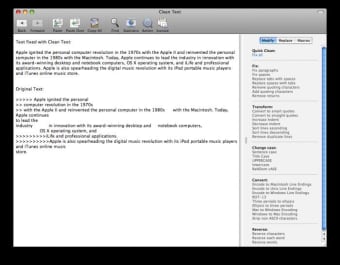
Apimac Clean Text is the sort of program that is only focused on cleaning up text. No editing features found here. You'll simply have to paste your text into the interface than use of the default fixes to clean up case, reverse characters, transform quotes and lines or fix paragraphs and spaces.

If you don't have time to waste you can just choose to fix all.

Clean Text also allows you to batch replace certain words and sentences and create macros so you can have your own selection of fixes to work with.

Despite the usefulness of macros, I felt that Cleant Text lacked flexibility, especially in terms of the rules or fixes you can work with. For date for example, you only have a choice of three different formats.

Clean Text is still a very handy tool if you are in a hurry and need to clean up text fast. However some users will be disappointed by its lack of flexibility.


Pros
  • Clean up quickly
  • Set of pre-established fixes
Cons
  • Not flexible enough
Download Apimac Clean Text '08

Apimac Clean Text is virus free

We have analyzed the latest version of Apimac Clean Text with 30 antivirus engines and it is virus free. See analysis results.

TESTED VIRUS FREE - Softonic GUARANTEED

Developer's description

Apimac Clean Text is a tool dedicated to webmasters, graphic designers and magazine editors to reduce text cleanup time. Clean Text eliminates all text formatting and performs other useful functions, such as removing empty lines, removing unwanted spaces, removing tab characters, converting smart quotes, tabs, returns, and more.

It's a must when you have to paste some text copied from one document or application into another, and you want the text to get the attributes (such as color, font, dimension and style) of the new document instead of preserving the attributes copied from the old one.

What's more, the brand new Quick Clean action let you solve with a single click the most common cleaning problems of text found in email messages, documents and web pages.

Review and rate Apimac Clean Text

Your avatar

Your opinion is important.
Help other users - be the first to review this program.

Review
  1. Maximum: 75 characters

  2. See example

Pros and Cons
Rate
  1. What rating would you give Apimac Clean Text?

    You need to fill in all fields

    • Usability:

      Not rated
    • Stability:

      Not rated
    • Installation:

      Not rated
    • Functionality:

      Not rated
    • Appearance:

      Not rated
    • Overall rating:

      Not rated
  2. Don't worry, we won't make your email address public.

You're not allowed to share serial numbers, cracks, etc. or link to pages that contain them. If you do, your user account will be deleted, your IP address logged and legal action will be taken.

Get started - just ask a question!

Write a title for your question.

Alternativesto Apimac Clean Text

  • In English:
    HexEdit
    HexEdit

    Mac hexadecimal editor

    Softonic rating:
    • 8/10
    User rating:
    • 10/10
  • Free:
    PDFMergeX
    PDFMergeX

    Merge, transform and join PDF documents

    Softonic rating:
    • 8/10
    User rating:
    • 9/10
Compare with Apimac Clean Text

Screenshots from Apimac Clean Text

Download rank: General

23 of 25

Softonic rating:
  • Good
  • 7/10
Your rating:
Your rating
  • 0

Review and rate this program

Top Downloads: General

  • United States
  • Global

  1. The industry standard PDF reader

Reviews of Apimac Clean Text in other languages